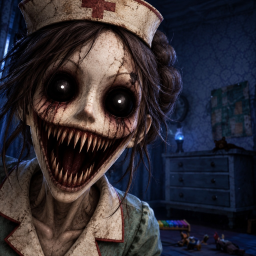
Get Out! (Horror gamezzz) Codes (November 2026)
1 working codeUpdated
Get Out! has 1 working code. Last checked Nov 26, 2026 (today).
Working Get Out! codes
- free rewardsGame description
Redeem in 3 steps
- Open Get Out! on Roblox.
- Find the Codes, Shop or Twitter button in the menu.
- Paste the code and press Redeem.
How to redeem codes in Get Out!
- Open Get Out! on Roblox, on any device.
- Look for a menu button on the side or bottom of the screen. It is usually called Codes, Twitter, Shop, Settings or shows a gift or bird icon.
- Type or paste the code into the text box. Codes are often case sensitive, so use the Copy button above to avoid typos.
- Press Redeem (or Enter) and your reward arrives straight away.
The exact redeem screen differs between games and developers move it around in updates, so if you cannot find it, check the game's description and the buttons in its main menu. Some games lock codes behind a minimum level or playtime. See the full guide to redeeming Roblox codes for tips.
More Roblox games with working codes
Games you looked at
Newest codes on the site
 CRAZY 8 Ball5 FREE SPINS + $5,000 · added Nov 26, 2026
 Roll A Stickman!3 luck potions · added Nov 26, 2026
- Roll A Stickman!400 rolls · added Nov 26, 2026
 Ragdoll Sandbox$250 · added Nov 26, 2026
- Ragdoll Sandbox$250 · added Nov 26, 2026
Most played games with codes
 Blox Fruits25
 99 Nights in the Forest1
 RIVALS3
 Dandy's World1
 Anime Adventures12
 Fish It!2
 Jujutsu Shenanigans2
 Fisch3
 Bee Swarm Simulator9
 Dress To Impress5
Get Out! facts
- Players now
- 27
- Creator
- Horror gamezzz
- Genre
- Survival
- Last updated
- Nov 25, 2026
- Total visits
- 402,115
Get Out! codes FAQ
What are the newest Get Out! codes?
The newest working Get Out! codes we have are LAUNCHDAY. The full list above was checked on Nov 26, 2026.
How do I redeem codes in Get Out!?
Open Get Out!, find the Codes or Shop menu, paste the code into the text box and press Redeem. The exact button differs from game to game.
Why is my Get Out! code not working?
The code has probably expired, was typed with the wrong capital letters, or you have already redeemed it. Copy it with the button on this page, and try again after rejoining the game.